
Disclosure: we may earn a commission if you buy through links on this page, at no extra cost to you. It never changes our verdict. How we review
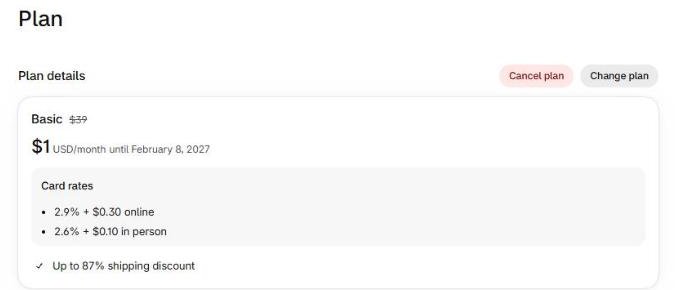
Shopify gives new stores 3 days free with no credit card, then $1 a month for 3 months. That works out to roughly 93 days of Shopify for $3. You can build the whole store, connect a domain and start selling before you ever pay the regular price, which is $39 a month on Basic ($29 billed yearly). The catch: apps, themes and card fees aren’t part of the $1 deal.
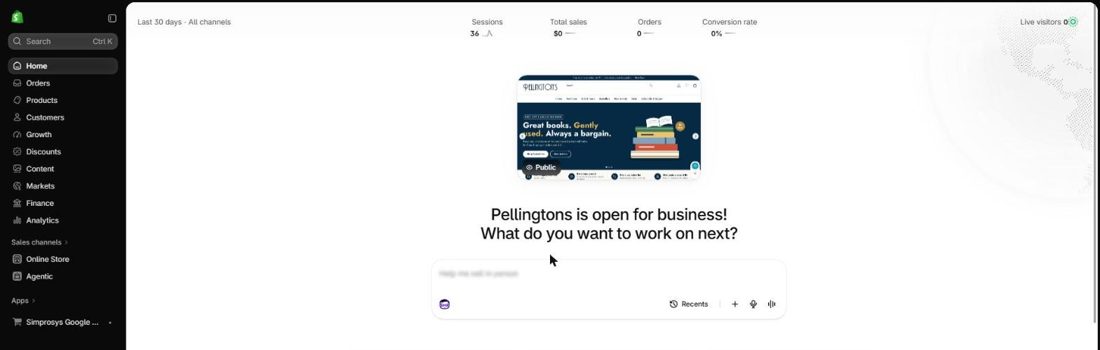
Search for “Shopify free trial” and you’ll see claims of 14, 30, 60 and 90 free days. Most of those are out of date. We put a real store on the offer, a small used-book shop called Pellingtons, so the screenshots below come from an actual setup. Here’s what the offer looks like right now, what you can do with each part of it, and a step-by-step plan to get a store built and selling before the cheap months run out.
What the Shopify trial actually includes
The trial comes in two parts. The first is short and free. The second is where the real value is.
| Part | How long | Cost | What you can do |
|---|---|---|---|
| Free trial | 3 days | $0, no card | Build the store: add products, pick a theme, change settings. Store stays password-protected. |
| Paid trial | 3 months | $1 a month | Everything on your chosen plan, including taking real orders on your own domain. |
| Regular plan | After that | $39/mo Basic ($29/mo yearly) | Keep selling at the normal price of whatever plan you picked. |
Based on Shopify’s signup offer in November 2026. Shopify changes promotions from time to time, so the plan screen inside your trial is the final word.
So is it really a 90-day free trial?
Not quite, and plenty of sites blur this. Only the first 3 days are free. The 3 months after that cost $1 each, and you need a card on file to start them. But $3 for three months of a store that normally runs $39 a month is close enough to free that it’s the best way to try Shopify properly. Three days isn’t long enough to judge a store builder. Three months is long enough to make your first sales.
What the $1 doesn’t cover
- Paid apps. Apps bill at their own prices from day one. Many have free plans or their own trials, but not all.
- Paid themes. Shopify’s free themes are fine to start. Premium themes are a one-time purchase, usually $100 to $500.
- Card processing. You still pay processing on every sale, such as 2.9% + 30¢ per online order on Basic in the US.
- Your domain. Expect around $10 to $20 a year, whether you buy it through Shopify or elsewhere.
Shopify’s trial page also advertises 1% back on sales as subscription credits for new stores. It’s a nice extra, but read the terms on the signup page before counting on it.
Which plan to choose for your $1 months
When your 3 free days end, Shopify asks you to pick a plan, and the $1 offer shows up on that screen. Pick the plan you’d actually stay on, because that’s the price you’ll pay once the promo ends.
| Plan | After the promo | Online card rate (US) | Who it suits |
|---|---|---|---|
| Starter | $5/mo | 5% + 30¢ | Selling a few items through social media or links, no full store |
| Basic | $39/mo or $29/mo yearly | 2.9% + 30¢ | Nearly every new store |
| Grow | $105/mo or $79/mo yearly | 2.7% + 30¢ | Stores already doing steady sales with a small team |
US prices as of November 2026. See our Shopify pricing guide for every fee.
Basic is the right call for almost everyone starting out. It’s a complete store with unlimited products, discount codes, gift cards, abandoned-cart emails and discounted shipping labels. Grow only pays for itself once your sales are high enough that its lower card rate covers the bigger monthly fee, and that’s not a problem you’ll have in month one.
How to set up your Shopify store in 10 steps
You can get through steps 1 to 8 inside the 3 free days if you’re focused. Steps 9 and 10 happen once you’ve picked a plan.
1. Start the trial
Go to Shopify’s signup page and create an account with your email. Shopify asks a few questions, like what you plan to sell and where you’re based. Answer honestly, since it uses them to set up your currency and suggest settings, but nothing here is permanent. Shopify also gives you a free yourstore.myshopify.com address. Customers won’t see it once you connect your own domain, so don’t lose sleep over it.
2. Fill in your store details
Open Settings → General and enter your store name, contact email, business address and store currency. Sort out the currency now: switching it after you’ve taken orders is messy. Then check Settings → Notifications and add your logo to the customer emails, since those order confirmations are often the first thing a new buyer reads after paying.
3. Add your first products
Go to Products → Add product. For each one, fill in:
- Title and description. Write for the buyer: what it is, who it’s for, size or materials, and why it’s better than the version they’ll find on Amazon.
- Photos. At least three, ideally square and on a plain background, plus one showing the product in use.
- Price and compare-at price. Only use compare-at if the item genuinely sold for more before.
- Inventory and SKU. Turn on tracking if you hold stock, so you don’t sell what you don’t have.
- Weight. Easy to skip, but Shopify uses it to calculate shipping rates, and a missing weight means wrong shipping charges.
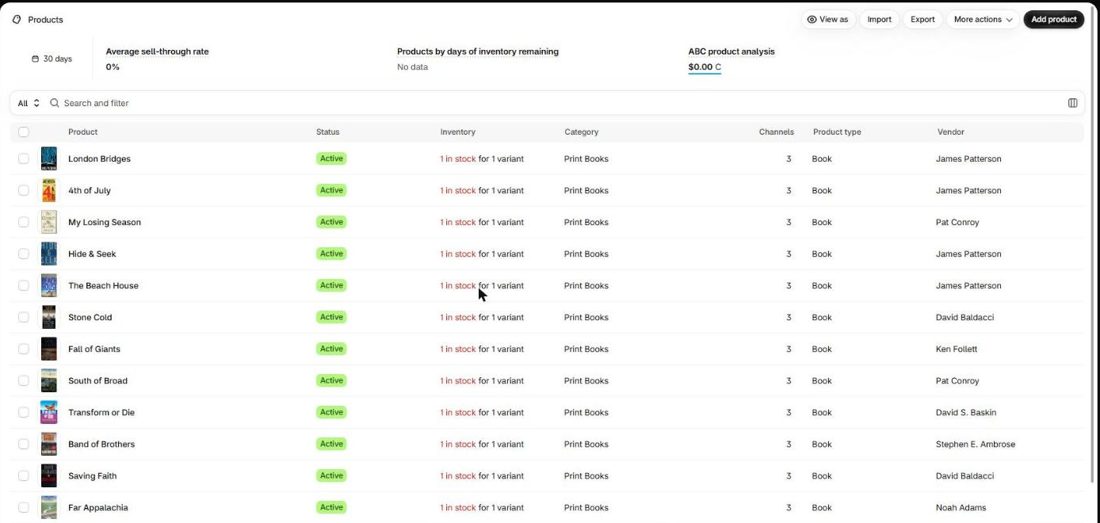
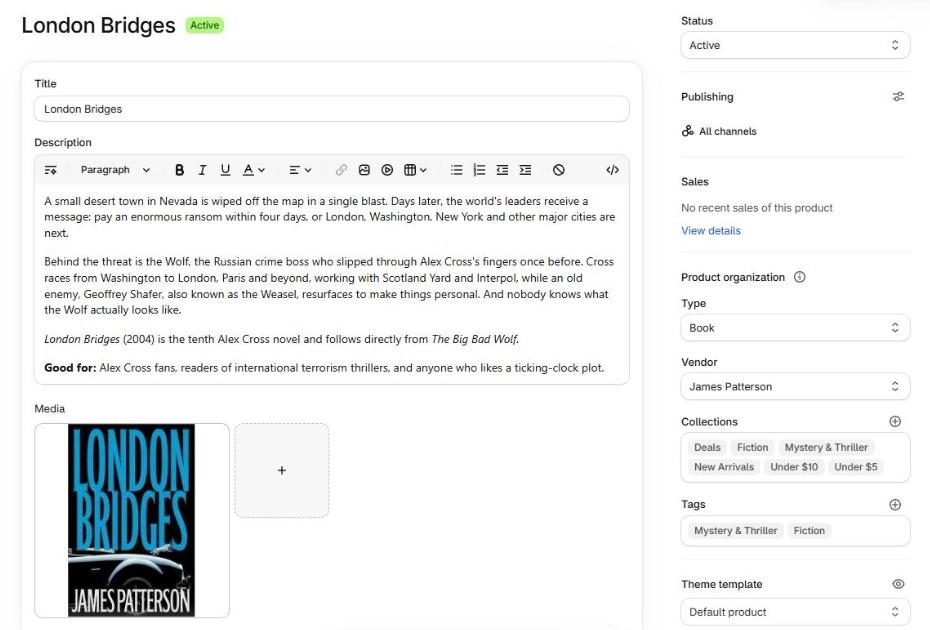
Five to ten products is plenty for launch. If you don’t hold stock, a print-on-demand app can create products for you. Our best print-on-demand companies guide compares the main options.
4. Pick and customize a theme
Under Online Store → Themes, Shopify installs a free theme by default, and its free options are modern and mobile-friendly. Click Customize to add your logo, set your colors and fonts, and rearrange the homepage sections. Keep the homepage simple: a clear headline that says what you sell, your best products, a short reason to trust you, and a newsletter signup. Hold off on paid themes until you have sales. A $350 theme won’t fix a store nobody visits yet.
5. Set up payments
Go to Settings → Payments and activate Shopify Payments. It takes cards, Apple Pay, Google Pay and Shop Pay, and it’s the only option that avoids Shopify’s extra transaction fee on top of processing. You’ll need your business or personal tax details and a bank account for payouts. Add PayPal as a second option, because some shoppers won’t buy without it.
6. Set up shipping
In Settings → Shipping and delivery, choose how you charge. Flat rates are easiest to understand: one price for standard shipping, one for express. Calculated rates pull live carrier prices based on weight and address, which is more accurate if your products vary a lot in size. Many stores add free shipping over a set order value, set a bit above their average order, to nudge shoppers to add one more item. On Basic you can buy discounted USPS and UPS labels right from your orders page.
7. Set up taxes
Open Settings → Taxes and duties. In the US, Shopify can calculate sales tax automatically once you tell it where you’re registered to collect. The rules depend on where you and your customers are, so check with an accountant if you’re unsure what applies to you. We’re not tax advisors, and this is the one step not to guess on.
8. Add your policies and key pages
Customers look for these before they buy, and payment providers expect them. In Settings → Policies, Shopify can generate starting templates for your refund, privacy, terms of service and shipping policies. Edit them to match how you actually work. Then create an About page and a Contact page under Online Store → Pages, and add all of them to your footer menu.
9. Connect a domain
A custom domain makes the store look real. You can buy one inside Shopify under Settings → Domains, or buy it from a registrar like Namecheap, which is often cheaper to renew, and connect it in the same menu. Either way, Shopify sets up the security certificate for you.
10. Choose a plan, test, and launch
Pick your plan to unlock the $1 months, then place a test order before you tell anyone about the store. Shopify Payments has a test mode for this, or you can place a real order and refund it. Check that the confirmation email arrives, the shipping charge is right and the order shows up in your admin. Finally, go to Online Store → Preferences and remove the storefront password. You’re live.
A plan for your 3 months at $1
The trial is cheap, but the clock still runs. This is roughly how we’d split the three months so you reach full price knowing whether the store works.
| When | Focus | What to get done |
|---|---|---|
| Month 1 | Finish and launch | Products, policies and payments done; test order placed; store live. Install only the apps you need, like reviews and email capture. |
| Month 2 | Get first visitors | Share with friends, family and social followers. Start a simple welcome email. Write proper product titles and descriptions so Google can find them. |
| Month 3 | Decide | Look at your numbers: visitors, orders, what sold. Decide whether to stay on Basic, switch to yearly billing to save, or change plans. |
For month one, our list of essential Shopify apps for new stores covers the few that are worth installing straight away. For month two, email marketing is the cheapest way to turn first-time visitors into repeat buyers.
What Shopify costs after the trial
Here’s a realistic monthly bill for a small store on Basic, billed yearly, selling about $1,000 a month across 30 orders.
| Cost | Monthly |
|---|---|
| Shopify Basic (billed yearly) | $29 |
| Card processing (2.9% of $1,000 + 30¢ × 30 orders) | $38 |
| Apps (a review app and an email tool on free or starter plans) | $0 to $20 |
| Domain (about $15 a year) | about $1.25 |
| Total | about $68 to $88 |
An estimate, not a quote. Card fees grow with your sales, and app costs depend on what you install.
If you pay monthly, Basic is $39 instead of $29. Once you’re confident the store is staying open, yearly billing saves about 25%.
Mistakes to avoid during the trial
- Installing a pile of paid apps. They bill at full price even while you’re paying Shopify $1. Uninstall anything you’re not using, because removing an app stops its charges.
- Picking a plan you won’t stay on. The $1 price is temporary. The plan you choose decides what you’ll pay from month four.
- Losing track of the end date. Put a reminder in your calendar for two weeks before the promo ends, so the switch to full price is a decision, not a surprise.
- Launching with demo content. Remove sample products and placeholder text, and check every page on your phone.
- Skipping the test order. A broken checkout or a wrong shipping charge costs you real customers.
- Using a third-party payment provider instead of Shopify Payments. Shopify adds an extra transaction fee on top, unless you have a specific reason to use another provider.
Is Shopify the right fit?
Shopify is the easiest way to run a proper online store without touching code, and the $1 offer makes it cheap to find out if it suits you. If you want lower monthly costs and don’t mind more hands-on work, compare it with WooCommerce in our Shopify vs WooCommerce guide, or with Wix in Shopify vs Wix. For the full picture of features, pros and cons, see our Shopify review.
Three days free plus three months at $1 is the best way to try Shopify. Pick Basic, spend the first few days on the setup steps above, and use the cheap months to make your first sales before you pay full price.
Frequently asked questions
How long is the Shopify free trial?
Shopify gives new stores 3 days free with no credit card. After that, you can keep going for $1 a month for 3 months, which works out to roughly 93 days for $3.
Is there a 90-day free trial on Shopify?
Not a free one. The 90 days come from the $1-a-month offer that follows the 3-day free trial. You pay $1 for each of those three months and need a card on file.
Can I sell during the Shopify trial?
Not during the 3 free days, when your store stays password-protected. Once you pick a plan and start the $1 months, you can take real orders.
What happens when the $1 months end?
Your plan switches to its regular price, such as $39 a month for Basic billed monthly or $29 a month billed yearly. You can change or cancel your plan before then.
Which plan should I pick for the $1 offer?
Basic, for almost every new store. It includes everything you need to sell, and its regular price is the lowest for a full online store.
Do apps and themes cost $1 during the trial?
No. Paid apps and premium themes charge their normal prices. Shopify’s free themes and the free plans of many apps are enough to get started.

Leave A Comment